TICK24
Version 1.0 · macOS · Buy on Gumroad
The first native 24 PPQ sequence editor and hardware bridge for the E-mu SP-12 and SP-1200.
Tick24 talks to the SP-12 over MIDI the way the SP-12 talks to a disk drive, using its native storage protocol. In disk mode, the SP-12 sends its memory page by page over MIDI to an external drive and loads it back the same way. Tick24 answers as that disk: Save Sequences hands Tick24 the sequences in the SP-12’s own format, you edit every event on the Mac, Load Segment brings the edited segment back, and Verify lets the SP-12 check the result itself.
On the SP-1200, Tick24 edits the sequencer memory live over MIDI. A small extension, added by Tick24 to your own copy of OS 1.2 and booted from floppy, gives it direct access: no transfer to start on the panel, and every edit lands in the SP-1200 at once.
Coming soon: support for the Rossum SP-1200, and versions for Windows and iPad.
Your license includes all future Tick24 updates: every model and feature added later comes to you automatically, at no extra cost.
05.01 / NATIVE EVENT CODEC
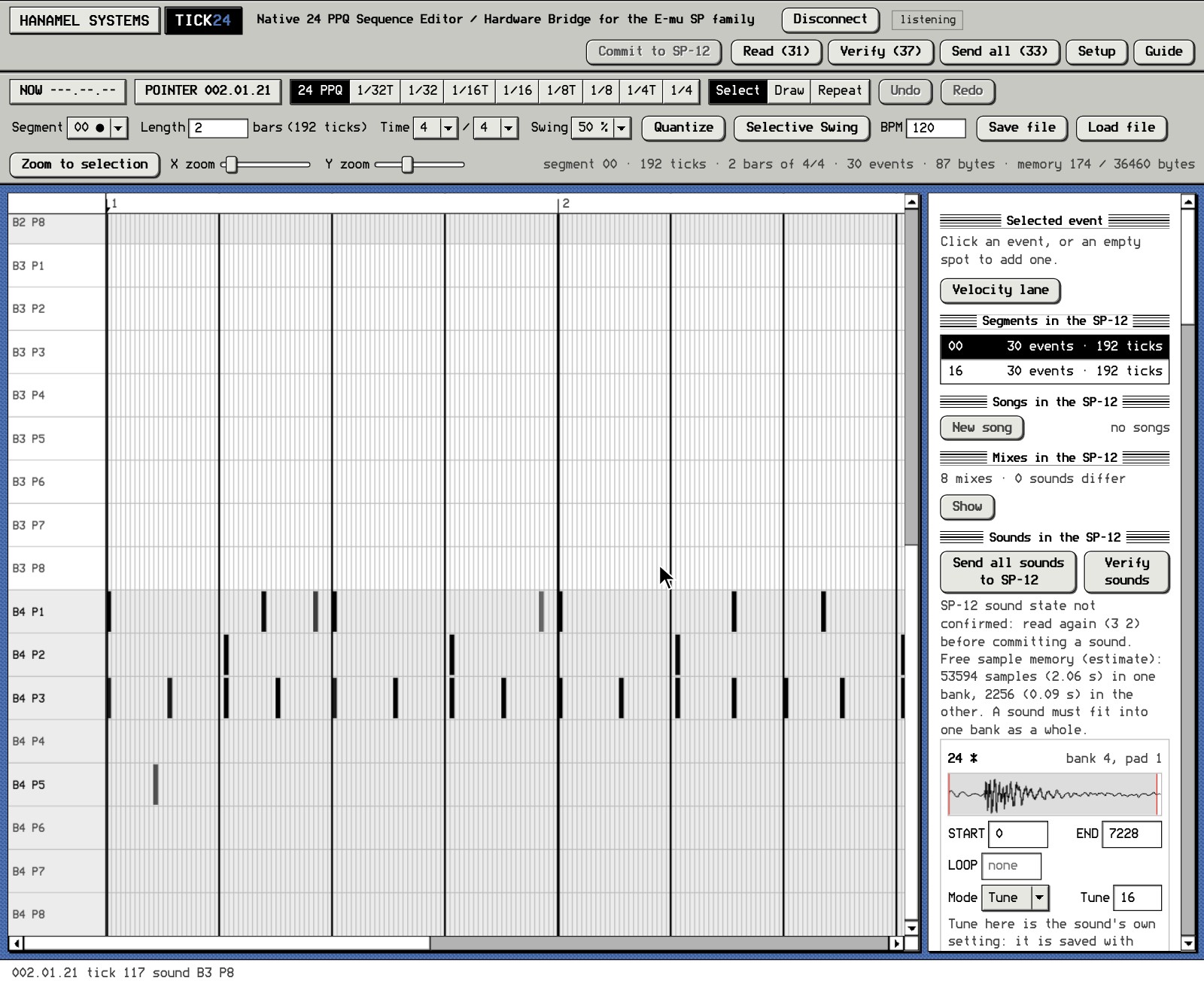
In SP terms, a pattern is a segment. A segment holds the notes recorded into it, and a song chains segments together. Each note is stored as an event: its position at 24 PPQ (24 ticks per quarter note, 96 in a 4/4 bar), the sound it plays (one of 32, chosen by bank 1–4 and pad 1–8), its level (0–31) and its tune. On a sound in Decay mode the tune value is a decay offset instead.
Tick24 reads and writes these events in the SP’s own format. Every edit changes the actual event in the segment; nothing is converted to MIDI notes and back.
The codec was built by reverse engineering the SP-12 firmware and checked against sequences read from a real SP-12. The SP-1200 stores its sequences in exactly the same format, so the same codec serves both machines; this was confirmed with sequences read from SP-1200 disks and over MIDI. Before an edited segment is committed to an SP-12, Tick24 calculates what the SP-12 will hold afterwards, and the SP-12’s own Verify function can compare the two.
05.02 / STOCK FIRMWARE (SP-12)
Tick24 needs no modification to the SP-12. The original EPROMs and operating system stay in place, and none of Tick24’s code ever runs inside the machine.
- The SP-12’s own functions - Reading, committing and verifying use the storage functions built into the SP-12: Save Sequences (3 1), Load Segment # (3 4), Verify Sequences (3 7) and their sound counterparts. You start each transfer on the SP-12 panel; Tick24 answers.
- The SP-12’s own timing - Tick24 does not play your sequences. The SP-12 plays them with its own sequencer and clock, exactly as E-mu built it. Tick24 only follows the playhead from the SP-12’s MIDI clock.
- Reading leaves the SP-12 untouched - Save Sequences (3 1) only sends the SP-12’s memory to Tick24; the machine’s memory stays exactly as it was. Every state read is also kept on the Mac.
- One segment at a time - A commit replaces exactly one segment and leaves the rest of the SP-12’s memory untouched.
05.03 / OS INTEGRITY (SP-1200)
The SP-1200 loads its operating system from floppy at every start. Tick24 adds its extension to your own copy of OS 1.2 on that disk; nothing is stored in the machine.
The extension is 364 bytes of code in a 371-byte area that is empty in OS 1.2, plus 16 bytes of state in another empty area. Outside those, exactly 5 bytes of the original OS differ: a 3-byte jump that lets the extension see incoming MIDI bytes, and a 2-byte address that hands it the end of a Tick24 message. The 16-character start-up message can optionally be changed as well (default TICK24 REMOTE OS). Everything else, including the sequencer, sampler, MIDI, Sample Dump and disk code, is E-mu’s original; the extension only answers Tick24’s own SysEx messages.
Tick24 accepts only OS 1.2 and checks every byte before it replaces it. Your original disk is never written: boot it and the machine is exactly as before.
05.04 / FEATURES
- Piano roll view for the SP sequencer - View and edit the sequence in a piano roll, on any tick or on a musical grid, with bars in each segment’s own time signature, such as 3/4, 6/8 or 7/8. Tick24 works on the SP’s own event data, so every edit lands exactly where you place it, and the SP’s own sequencer plays it back.
- Every note parameter editable - Each note has its own Level (0–31) and Tune (−8 to +7), the values Multi Level and Multi Pitch record. Tune/Decay mode is set per sound, as on the SP: on a sound in Decay mode, the note’s value sets Decay instead of Tune.
- Selective Swing - On the SP, swing is a setting of the whole segment: every note exactly on the second 8th of a beat plays later by the same amount, a chord moves as one, and the swing restarts at every bar line. Tick24 shows those notes where the SP actually plays them, and the preview plays them there. Selective Swing applies the same swing only to the notes you select, at the SP’s own amounts (54–71 %), or swings 16ths (58, 67 or 75 %) without doubling the tempo. On the SP itself, 16th swing takes the double-tempo method: the pattern is programmed at twice the tempo, so its 8th-note swing falls on the 16ths. The rest of the segment stays as it is, and the swung notes are stored at their new positions, so the SP plays them exactly as you hear them in Tick24. The rule was measured on SP-1200 hardware; the SP-12 firmware contains the same code.
- Sounds - Read the sampled sounds with their waveforms. Set START, END and LOOP with sample accuracy. Export any sound as a WAV file. Send one sound back or restore the whole sound memory.
- Songs - Every song step is decoded and shown in order: segments, repeats, tempo changes, mix changes, sub-songs and links. Song length and playing time follow each step. Add any step at any position, move or remove steps, edit the tempo, or build new songs from existing segments.
- Mixes - Set the levels on the SP with its sliders; Tick24 lists the eight stored mixes per sound, copies a whole mix or one sound’s setting between mixes, and recalls mixes with Mix steps in songs, for example to bring sounds in and out between song steps.
- Playhead sync - Follows the SP’s own MIDI clock while it plays.
- Project files and automatic backups - Save and load complete projects; every read and every commit is backed up automatically.
SP-1200
- Live editing over MIDI - Tick24 reads and writes the SP-1200’s sequence memory directly. Edits reach the SP-1200 without a transfer started on the panel. Before every write, Tick24 reads the SP-1200’s memory again, so nothing changed on the panel in the meantime is overwritten.
- Remote OS disk - Tick24 builds the boot disk from your own SP-1200 OS 1.2 disk image (SCP, HFE or raw image in; SCP and HFE out).
- Song editing - Edit the songs stored in the SP-1200: tempo and steps.
- SP-12 to SP-1200 sound transfer - Sample for sample
Coming soon
- Rossum SP-1200 - Support for the SP-1200 reissue by Rossum.
- Windows and iPad - Tick24 for Windows PCs and for the iPad.
05.05 / INSTALLATION
Tick24 is a standalone Mac application. Nothing is installed on the SP-12. Connect the SP-12 to a MIDI interface in both directions, start Tick24, choose the MIDI ports and press Connect. The Guide button in the app shows the panel keys for every transfer.
For the SP-1200, Tick24’s Make remote OS disk adds the extension to your own OS 1.2 disk image and saves the result in two formats; Tick24 contains no E-mu software. It reads SCP, HFE (v1) and raw disk images, and writes:
- Floppy drive in the SP-1200 - an SCP image. Write it to a blank double-density floppy with a Greaseweazle floppy controller and boot the SP-1200 from it.
- Gotek, HxC or another floppy emulator - an HFE image. Copy it to the USB stick or SD card next to your original OS image and select it on the emulator, as you do with any other disk. No Greaseweazle is needed: if the emulator already boots your OS 1.2 from an HFE file, use that file as the input.
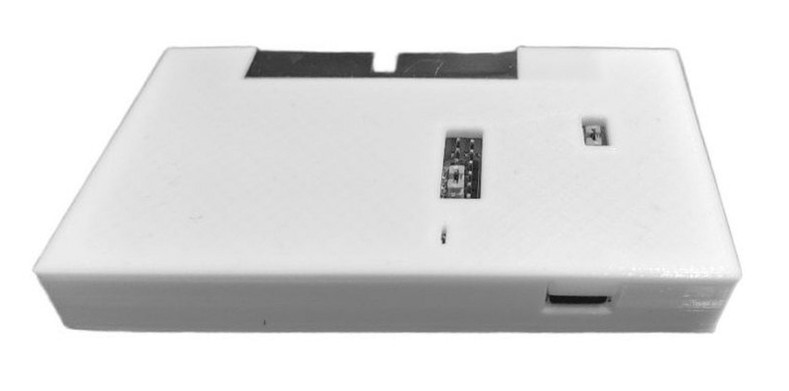
What a Greaseweazle is - An open-source USB controller that connects a standard 3.5" PC floppy drive to the Mac and reads the disk at the level of the magnetic signal. This lets Tick24 read and write the SP-1200’s disk format, which no computer drive understands. Your original disk is only read, and the same tool makes exact archive copies of your sound and sequence disks. Available from retro computing shops worldwide; see the official list on the Greaseweazle wiki.
What you need to write a disk - The Greaseweazle is only the controller: it reads and writes through an ordinary floppy drive. Besides the Mac you need:
- The Greaseweazle - A case for the board can usually be chosen with the order.
- A 3.5" PC floppy drive - The internal kind with a 34-pin connector, as built into desktop PCs, not a USB floppy drive. Many shops sell a complete set with a drive.
- Cables - Ask for them with the order: a 34-pin floppy ribbon cable, a floppy power cable with the small 4-pin connector, and a USB cable.
How it connects - The ribbon cable goes from the 34-pin connector of the Greaseweazle to the 34-pin connector of the drive; the coloured stripe marks pin 1 on both ends. The drive is powered by the Greaseweazle: the small 4-pin floppy power cable runs from the power header on the board to the drive, which draws its 5 V from USB. The Greaseweazle connects to the Mac with the USB cable. The SP-1200 disk goes into the drive.
05.06 / REQUIREMENTS
- E-mu SP-12 Turbo (developed and tested on firmware Rev 2.6), or E-mu SP-1200 with OS 1.2.
- A MIDI interface, connected in both directions (two MIDI cables).
- SP-1200: your own copy of the OS 1.2 disk as an image file (SCP, HFE or raw). With a floppy drive: a blank double-density floppy, a Greaseweazle and a 3.5" PC floppy drive to write it. With a Gotek, HxC or similar floppy emulator: nothing else, the HFE file goes on its USB stick or SD card.
- macOS 12 or later (Apple silicon or Intel).
05.07 / KNOWN LIMITATIONS
- SP-12: every transfer is started on the panel (CASSETTE/DISK and the function number). Tick24 cannot start a transfer on its own.
- SP-12: commits are made one segment at a time, while the SP-12 is stopped.
- Edits that have not been committed exist only in Tick24 until they are sent with Commit or Send all.
- Tunes set with the SP-12’s sliders in Tune/Decay mode are not sent by the SP-12 over MIDI, so they cannot be saved or restored. The Tune setting of each sound in Tick24’s Sounds panel is saved and restored.
- Time signatures are set in Tick24 as 1–16 beats of a quarter, eighth or sixteenth note. Any other value stored on the SP is shown and kept.
- SP-1200: the Tune value of a sound in Tick24’s Sounds panel is the tune of the pad that plays it, the value the Tune/Decay slider sets. It applies to pads, MIDI notes and new recordings; notes already recorded keep their own tune, and it is not stored with the sequences.
05.08 / LICENSE
Single-user license for two computers, all updates included. Buy Tick24 on Gumroad. Read the license agreement. Help and error reports: support.
05.09 / RELEASE HISTORY
1.0 · 17 October 2026 · First public release. E-mu SP-12 Turbo and E-mu SP-1200 (OS 1.2), macOS.