TICK96
Version 1.1 · Released 30 October 2026 · macOS · Buy on Gumroad
The first native 96 PPQ sequence editor and hardware bridge for the Akai MPC2000, MPC2000XL and Roland W-30.
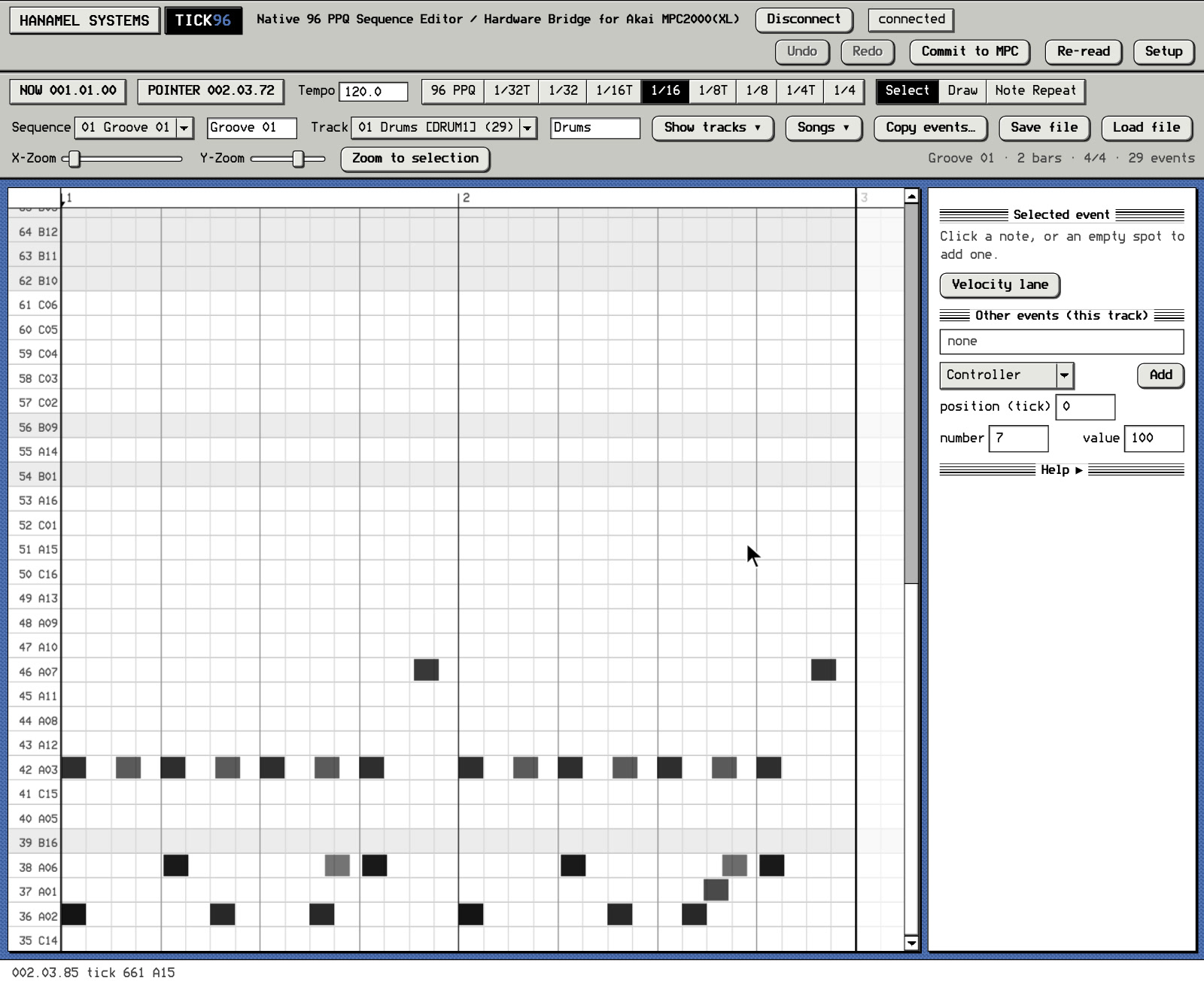
Tick96 talks to the MPC over MIDI, but not in the usual way: a small extension to the MPC’s operating system, built by reverse engineering OS 1.20 (MPC2000XL) and OS 1.72 (MPC2000), adds SysEx commands that read and write the sequencer’s event list in memory, the same events you see in Step Edit.
Hardware demo - Tick96 running on an MPC2000XL: youtu.be/NDRFlSXEWpQ
Your license includes all future Tick96 updates: the Windows version and support for every drum machine, sampler and workstation added later come to you automatically, at no extra cost.
04.01 / NATIVE EVENT CODEC
Events are read and written in the MPC’s own 8-byte format: position at 96 PPQ, event type, duration, velocity and the note’s variation parameter (tune, decay, attack or filter). Every edit in Tick96 changes the actual Step Edit event inside the MPC.
The MPC2000 has its own extension, written for OS 1.72 and its 6-byte event format. Tick96 detects the connected model and uses the matching format.
04.02 / OS INTEGRITY
Tick96’s extension occupies about 5.6 KB of a 15.9 KB region that is empty in the original OS 1.20 file. Outside that region, exactly 11 bytes differ: one interrupt vector (4 bytes), a 5-byte hook that passes Tick96 messages to the extension, and the file checksum (2 bytes). Everything else is Akai’s original code.
Events are inserted, deleted and committed by the same OS routines that Step Edit uses.
Interrupt timing differs from the unmodified OS by less than 2 microseconds, and SysEx from other devices is handled exactly as before. A 200-minute hardware test of 159,301 random edits with full read-back completed without an error. Watch the full recording.
04.03 / FEATURES
New in Tick96 1.1
SCSI Link for the MPC2000 and MPC2000XL - Tick96 SCSI Link connects Tick96 to the SCSI port of the MPC2000 and MPC2000XL through a Raspberry Pi with a PiSCSI-compatible board, over Wi-Fi. A Tick96 extension loaded into the MPC’s RAM next to the stock OS handles the exchange on the MPC side. Tested on both units.
- Sound and program transfer - Single sounds and whole programs with all their sounds go from the Mac over Wi-Fi straight into the MPC’s memory, without a disk swap or a LOAD screen on the unit
- LCD mirror - The MPC’s display appears live in a Tick96 window
- Live editing during playback - Edits in Tick96 go straight into the running sequence and sound as soon as the playhead reaches them, and the tempo can be changed while the sequence plays
- Pad and mixer remote - Each pad’s sound and note parameters and its mixer settings are read and set from Tick96
- Remote Trim with non-destructive chop - A sound’s start, end and loop are edited on a large waveform on the Mac and written to the MPC as they move. The same waveform cuts the sound into slices that go to any pads in any order, as pad slices that leave the sound itself unchanged, or committed as new sounds
- Step locks and trig conditions - Single notes of a sequence get their own pad parameters (tune, filter, decay, pan, level, sample start and end) and play by probability, by pass (A:B), on FILL or after the previous condition, while the sequence runs. Each sequence keeps its own locks (lock values, probability and conditions can be mapped to a MIDI controller and turned live)
Sounds, programs, the display and the running sequence travel over SCSI, and Tick96’s short edit commands use one MIDI in / out pair, so the bulk of the data no longer passes through MIDI.
Also new in 1.1, over SCSI Link or MIDI
- Step sequencer view - A step grid alongside the piano roll, one row per pad, bar by bar, with 1/8 to 1/32T steps at the MPC’s own 96 PPQ timing - a click sets the step’s velocity (100, 75, 50 or 25 %), a right-click its offset in ticks, duration and velocity
- Euclidean rhythms - Rings on up to four pads, each with its own pulses, steps and rotation, so rings of different lengths (up to 32 steps) run against each other as polymeter - the rings follow the MPC’s playhead, and every change goes straight into the running sequence as ordinary MPC notes
- Controller mapping - Pad, mixer, trim and slice parameters, step lock values, probability and trig conditions can be mapped to the knobs and keys of a MIDI controller, and turned live while the sequence plays (right-click a parameter: Map to controller)
Sequence editing
- Every Step Edit event - Tick96 works at the sequencer’s own 96 PPQ resolution. Notes, controllers, program changes, pitch bend and pressure can be edited on any of the 384 ticks in a bar, or snapped to a musical grid
- Direct editing in the MPC - Every edit goes straight to the sequence in the MPC. Commit to MPC makes it permanent - Auto commit does this automatically after a set time without edits
- Sequences and tracks - Switch sequences and tracks from the Mac, and view the songs stored in the MPC. Tick96 reads each track’s type from the MPC: DRUM tracks show pad names (A01–D16), MIDI tracks show a keyboard (A-1 to C7)
- Note parameters - Set the velocity (volume), duration and variation parameter of each note: tune, decay, attack or filter
- Sequence and track settings - Sequence and track names (typed on the Mac, shown on the MPC display), tempo, track type, MIDI output channel, program change, track velocity and track On/Off are set from the Mac
- Copy events - Copy a range of one track or all tracks to another position, track or sequence, in Merge or Replace mode, with up to 99 copies
- Undo and redo - For every edit, including whole copy operations, with an adjustable number of steps
- Playhead - Follows the MPC’s own clock and its bar, beat and tick position
- The MPC overdub workflow preserved - Record and overdub on the MPC pads as usual, Note Repeat included. When you press STOP, the new take appears in Tick96
Roland W-30
- SysEx dump - Songs, tone and patch parameters and wave data over MIDI, in both directions (the stock W-30 only records SysEx into a song and doesn’t read MIDI sample dumps)
- Micro Edit on the Mac - Every event of the song, plus tracks, tempo, time signature and number of measures, at the W-30’s native 96 PPQ grid, with the W-30’s timing left intact
- Playback loop - Loop any measures and play or stop from the Mac (the W-30 doesn’t have this built in)
- Overdub workflow - Start the W-30’s punch-in or loop recording with a pre-roll - hit STOP and the take shows up in Tick96
- MPC-style swing - 50–75 % on 1/8 and 1/16
- Tone parameters - Pitch, TVF, TVA and LFO
- Wave data - WAV import and export, start, loop and end points
- Digital Filter - The W-30’s Wave Edit Digital Filter (low- or high-pass, 0.1–10 kHz, with resonance) and DC Cut run from the Mac and rendered into a new tone
- Keygroups - An Akai S-series style keygroup view of the W-30’s Tone To Key map, on both layers
- Project files - The song, and the W-30’s sound set, saved as files on the Mac and loaded back
MPC2000
Tick96 supports the MPC2000 as well, SCSI Link included. Two functions are MPC2000XL only for now and follow in free updates: writing the loop setting when a project file is loaded, and songs. The full feature list shows every function for both models.
Coming soon
- Print to SP-404 - MPC tracks bounced with their effects and written to an SP-404 card as a live set (grid-exact bounces of any bars, tracks or pads: Tick96 plays the sequence on the MPC, records the chosen parts with their effects through your audio interface, cuts them to the exact bar length with the reverb and delay tails included, and lays them out on the SP-404’s pads with loop and BPM set, ready to perform - for every SP-404 model)
- SCSI Link - A clickable front panel in the LCD mirror, step locks that follow sequence changes during playback, and BlueSCSI v2 support
- Next - Windows version and SP-404SX support
To follow later: more Akai MPC models (MPC1000 and MPC3000), the E-mu Emax and the Ensoniq EPS series. Each addition is a free update for existing licenses.
04.04 / INSTALLATION
Tick96 is a standalone Mac application with a built-in patcher. The patcher adds the Tick96 extension to your own copy of the original MPC operating system and builds the boot media on your Mac. Tick96 contains no Akai software.
On the MPC2000XL, hold REC + OVER DUB while switching the MPC on: the patched OS loads from the boot media into the MPC’s memory, and nothing is written to its flash memory. Switch the MPC off and on again without the keys and it starts its original OS.
The MPC2000 always loads its OS from disk, so there the patched file simply goes on a copy of your boot disk.
For SCSI Link, the Raspberry Pi is set up with one script on a standard Raspberry Pi OS Lite card. The Pi then serves the boot image that loads the SCSI Link extension into the MPC’s RAM, and nothing is written to the MPC.
For the W-30, Tick96 writes its system disk to a DD floppy.
04.05 / REQUIREMENTS
- Akai MPC2000XL with OS 1.20, or Akai MPC2000 with OS 1.72
- Your own copy of the original OS file: MPC2KXL.BIN (MPC2000XL, OS 1.20) or MPC2000.EXE (MPC2000, OS 1.72)
- Boot media for the MPC2000XL: SCSI (ZuluSCSI or BlueSCSI, at ID 0), floppy, Gotek or HxC. A CF card in a plain IDE adapter cannot boot the MPC
- Boot media for the MPC2000: a copy of your boot floppy (a USB floppy drive on the Mac is enough to write it), or the disk image your MPC already boots from
- A MIDI interface with one input and one output that passes SysEx, connected both ways: MPC MIDI OUT A to the interface, the interface to MPC MIDI IN 1
- A Mac running macOS 12 or later (Apple silicon or Intel)
- Roland W-30 with System 1.10, a DD floppy and a DD-capable drive for the Tick96 system disk
- For SCSI Link: a Raspberry Pi 4 Model B (1 GB RAM minimum, tested), a PiSCSI-compatible board and a SCSI cable - DB25 male-to-male for the MPC2000, HD50 half-pitch male to DB25 male for the MPC2000XL
04.06 / KNOWN LIMITATIONS
- The pad assignment cannot be read from the MPC. Custom assignments are entered in Tick96 (Setup → Pad assign…)
- Without SCSI Link, editing works while the MPC is stopped and on the Main screen, and every event is a separate MIDI message, so copying hundreds of events takes several seconds
- On the MPC2000XL, edits that have not been committed are lost when the MPC is switched off or changes to SONG mode. On the MPC2000 every edit is written to the unit at once
- The number of bars, the time signatures and the loop setting are read from the MPC. Tick96 writes them only when a project file is loaded with Replace - bars are inserted and deleted on the MPC
- On the MPC2000, loading a project file writes the number of bars and the time signatures but not the loop setting, and songs are neither read nor written yet. Both follow in free updates
- Step locks follow the sequence that was started with PLAY START. Switching to another sequence during playback keeps the first sequence’s locks until the next start
- Pad slices on the MPC2000XL need at least 1,400 frames (about 32 ms at 44.1 kHz) to sound. Tick96 warns about shorter slices
- Pad slices and step locks live in the MPC’s RAM and are not kept by the MPC’s own SAVE. Tick96 keeps them in the project file and sends them again after every boot
- After the first launch of a new Tick96 version, macOS asks for Local Network access. Allow it, then quit and reopen Tick96 so the waveform and SCSI Link transfers work
04.07 / LICENSE
Single-user license for two computers, all updates included. Buy Tick96 on Gumroad. Read the Tick96 license agreement. Help and error reports: Tick96 support.
04.08 / RELEASE HISTORY
1.1 · 30 October 2026 · SCSI Link for the MPC2000 and MPC2000XL, Roland W-30 support, step sequencer view, Euclidean rhythms, controller mapping.
1.0.0 · 10 October 2026 · First public release. Akai MPC2000XL and MPC2000, macOS.